Auto Detailing Pricing Calculator
Turn hourly target, labor hours, workers, materials, travel, overhead, margin, discount and sales tax into an estimated job cost, recommended selling price, customer price, gross profit and effective hourly revenue.
Mobile Detailing Operations Kit
Run the business side of your detailing jobs with one practical system. Get editable forms, pricing calculators and tracking tools for customer intake, vehicle inspections, estimates, work orders, invoices and job management.
PDF + editable Word files • Excel & Google Sheets compatible
The job is only half the work
The Mobile Detailing Operations Kit gives you one simple workflow for keeping those details organized without committing to expensive business software.
Collect customer, vehicle, inspection, pricing and payment information through one consistent workflow.
Use labor, materials, overhead and travel costs to think through pricing before sending the customer a quote.
Move each job from intake to inspection, estimate, work order, invoice and final tracking.
One workflow
You do not have to use every file for every customer. The kit is designed so you can use only the steps your business needs.
What you get
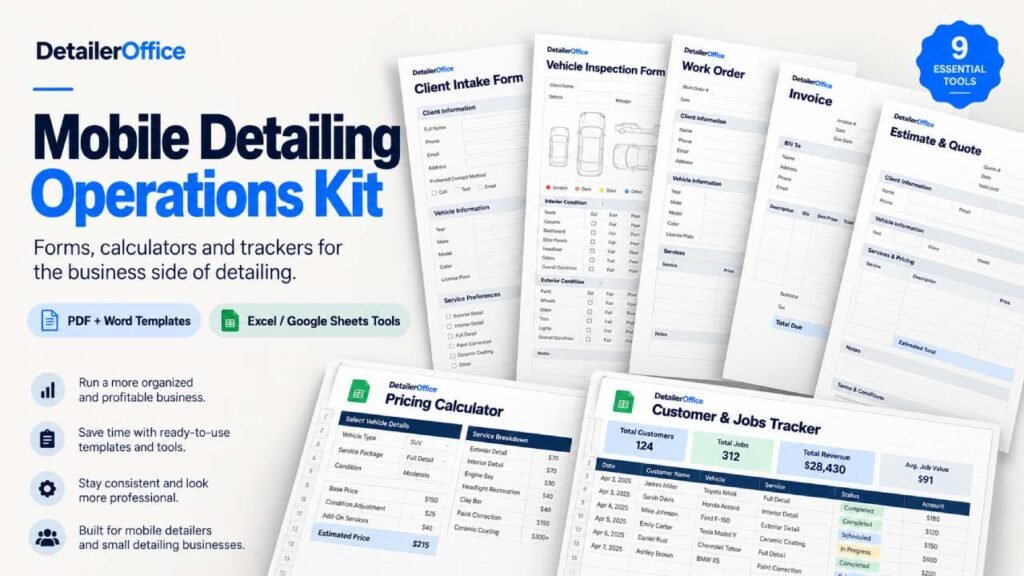
Nine resources in one download: five business documents, three spreadsheet tools and a guide that ties them together.
PDFWord Printable PDF plus an editable Word version of each document
Capture customer and vehicle information before the job.
Includes: customer information, vehicle details, lead source, preferred contact method, requested service, service location, existing coating/protection, vehicle access information, pet hair / odors / debris indicators, customer priorities and internal notes.
Create a pre-service vehicle condition record.
Includes: overall, exterior and interior condition; Minor / Moderate / Significant severity; pre-existing damage log; damage map; photo checklist; photo references and inspection completion.
Run the actual job after the estimate is approved.
Includes: Work Order # and Estimate #, customer and vehicle, assigned technician, scheduling, actual start/completion times, approved services, add-ons, pricing, additional work / change orders, extra pricing, job status, completion checklist, completion notes and internal detailer notes.
Bill the completed job and keep payment information organized.
Includes: Invoice #, Estimate # and Work Order #; customer and vehicle; services, quantities, rates and charges; discounts, sales tax and mobile/travel fees; deposits and previous payments; total and balance due; payment method, transaction reference, partial payment tracking and payment history; internal and customer-facing notes.
Prepare and present a quote before the work is approved.
Includes: Estimate #, date, valid until, customer, vehicle, services, add-ons, travel/mobile fee, discount, tax, estimated total, deposit required, notes and assumptions, and customer approval.
Excel / Google Sheets XLSX files built for Excel and Google Sheets
Turn hourly target, labor hours, workers, materials, travel, overhead, margin, discount and sales tax into an estimated job cost, recommended selling price, customer price, gross profit and effective hourly revenue.
Work out fuel cost, drive-time cost, total travel cost, a suggested travel fee and a recommended charge from distance, MPG, fuel price, drive time, tolls, parking, free allowance and minimum fee.
A workbook with Dashboard, Customers, Jobs, Payments, How to Use and Lists sheets for tracking customers, jobs, prices, deposits, balances, payment status, job status and lead source.
PDF 12 pages
Explains how to use the whole kit as a system, so the files work together instead of sitting in a folder.
Free templates or the full kit?
Free DetailerOffice resources
Good for solving one task
Mobile Detailing Operations Kit
Documents, calculators and tracking designed to work together
Not ready for the full kit? You can still use our free auto detailing business templates and upgrade later.
Price with more context
A $200 job is not necessarily a good $200 job.
Time, labor, product cost, travel, overhead and discounts all affect what remains after the work is finished.
Enter your labor hours, hourly target, workers, materials, overhead, travel, margin, discount and tax.
The calculator returns an estimated job cost, recommended customer price, gross profit and effective hourly revenue.
Enter round-trip distance, MPG, fuel price, drive time, hourly target, parking, tolls and other travel costs.
Use the result to decide whether travel should be included, charged separately or quoted differently.
These calculators are planning tools, not accounting or tax software.
See the business, not just the job
The Customer & Jobs Tracker gives you a lightweight operating view without forcing you into a full CRM.
Track customers, jobs, quoted and final prices, deposits, payments, balances and job status.
XLSX Works in Excel and can be imported into Google Sheets.
Built for small detailing businesses
Get started
Get the complete ZIP after purchase.
Store the originals and make copies for real customers and jobs.
Customize the editable Word files where needed.
Enter your own pricing and travel assumptions.
Follow the workflow from intake through invoice, then refine only what helps your business.
The complete kit
Every file described on this page, in one complete ZIP you can download right after purchase.
Mobile Detailing Operations Kit
Digital product. No physical item will be shipped.
Build a basic customer intake and vehicle inspection sheet directly in your browser with the free DetailerOffice tool.
Still deciding? The free templates are a good place to start.
Browse the free templatesThe kit includes Pro client intake, vehicle inspection, work order and invoice documents; an Estimate & Quote Template; Pricing Calculator; Travel Fee Calculator; Customer & Jobs Tracker; and a 12-page Quick Start Guide.
Yes. The business documents include editable Word versions in addition to printable PDF versions.
The spreadsheets were built using standard spreadsheet formulas and are designed for Excel and Google Sheets use. Some minor visual formatting can vary when an Excel file is imported into Google Sheets.
No. The kit is modular. A simple repeat maintenance job may require fewer documents than a new customer, large correction job or higher-value service.
No. The kit is a lightweight collection of forms, calculators and tracking tools. It is designed for businesses that want more structure without moving everything into dedicated CRM software.
No. It is an operational record for documenting visible vehicle condition. The kit is not a substitute for legal documents or professional legal advice.
Mobile detailers are the primary audience, but most of the forms and business tools can also be used by independent fixed-location detailing businesses.
Yes. The free templates remain available individually. The Operations Kit adds expanded Pro documents, calculators, tracking tools and a complete workflow.
Ready for a cleaner workflow?
Set up the kit once, then use the parts you need from customer inquiry through final payment.
Or start with the free templates